
The CT Superior Court case lookup tool lets you search any Connecticut court case for free. You just need a name or docket number to get started.
Over 1.2 million cases flow through Connecticut Superior Courts each year. Finding yours should not feel like a scavenger hunt.
This guide walks you through every search method available in 2026. You will learn how to find criminal, civil, and family cases online.
We also cover fees, sealed records, and what to do when your case seems to vanish from the system.
CT Superior Court Case Lookup
CT Superior Court case lookup is a free online search tool run by the Connecticut Judicial Branch. It lets anyone find active and closed cases from all 13 judicial districts.
The system covers civil, criminal, family, and housing matters. You can search from any device with an internet connection.
In 2026, the lookup tool pulls data from the updated case management system. Results now load faster and include more docket detail than in prior years.
Most new filings appear within 24 hours of submission. Older cases may take longer to surface in search results.
| Detail | Info |
|---|---|
| Cost | Free |
| Coverage | All 13 judicial districts |
| Case Types | Civil, criminal, family, housing |
| Update Frequency | Every 24 hours |
Think of it like a library catalog for court cases. You type in what you know, and the system pulls matching records.
Connecticut Judicial Branch Case Search
The Connecticut judicial branch case search is the official portal for all state court records. It lives on the judicial branch website under the “Case Lookup” tab.
You do not need to create an account for basic searches. The tool is open to the public around the clock.
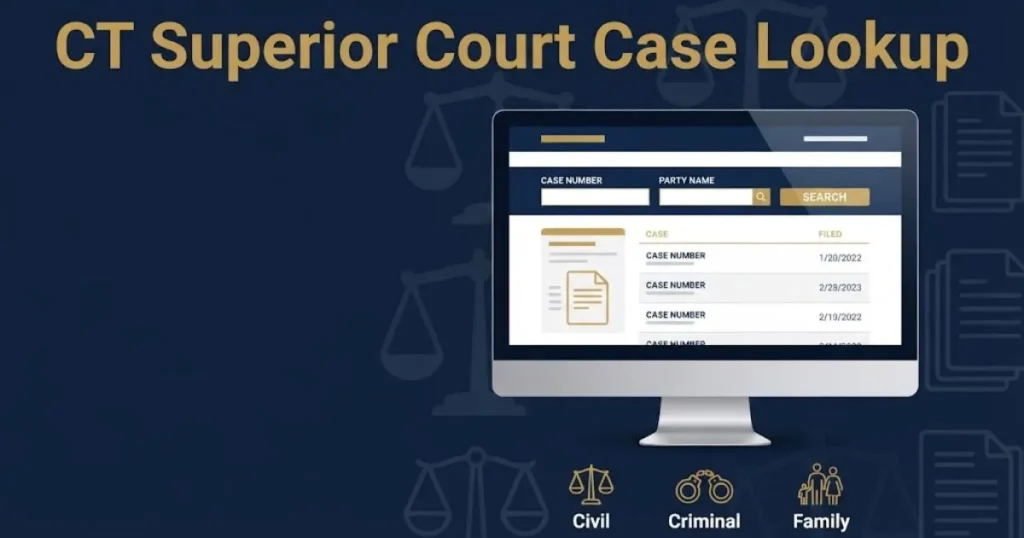
The search page offers three main entry points. You can search by party name, docket number, or attorney name.
Each method returns slightly different results. Name searches cast the widest net. Docket number searches are the most precise.
Quick Fact: The judicial branch processed over 450,000 electronic filings in the first quarter of 2026 alone.
The system works best on modern browsers. Clear your cache if results seem incomplete or outdated.
How to Search CT Court Records Online
Searching CT court records online takes about two minutes if you know the basics. Start by choosing your search type on the case lookup page.
Enter the last name first for party searches. Add a first name to narrow results. The system will return all matching cases across every judicial district.
For docket searches, enter the full docket number exactly as it appears. A typical format looks like this: CV-25-1234567-S.
The letters at the start tell you the case type. “CV” means civil. “CR” means criminal. “FA” means family.
| Docket Prefix | Case Type |
|---|---|
| CV | Civil |
| CR | Criminal |
| FA | Family |
| HD | Housing |
| SC | Small Claims |
If you get too many results, add a middle initial or a filing year. That trims the list fast.
Key Takeaway: The CT case lookup tool is free, covers all districts, and returns results within 24 hours of filing.
CT Superior Court Docket Number Search
A CT Superior Court docket number search is the fastest way to find a specific case. Every case gets a unique docket number when it is filed.
The number contains the case type, filing year, sequence number, and court location code. It acts like a fingerprint for your case.
You can find your docket number on any court notice or summons. It also appears on correspondence from the clerk’s office.
Type the full number into the docket search field. Do not add spaces or extra characters. The system is picky about formatting.
If you only have part of the number, try a name search instead. Partial docket numbers often return zero results.
Quick Tip: Docket numbers from before 2010 may use an older format. Try both old and new formats if your first search fails.
A docket search gives you the cleanest results. It pulls one exact case with full docket history and upcoming dates.
Connecticut Case Lookup by Party Name
Connecticut case lookup by party name works when you do not have a docket number. Type the last name in the search box and hit enter.
The system returns every case linked to that name across all districts. You may see dozens of results for common names.
Add a first name and middle initial to filter the list. You can also limit results by case type or judicial district.
Be careful with name variations. The court may list “Robert” in one case and “Bob” in another. Try multiple spellings.
| Search Field | Tips |
|---|---|
| Last Name | Required. Use legal surname. |
| First Name | Optional but helpful. |
| Middle Initial | Narrows common names. |
| Case Type | Filter by CV, CR, FA, etc. |
Name searches are great for background checks. They also help you find cases you did not know existed.
Key Takeaway: Use docket numbers for precision. Use name searches for breadth. Both methods are free and available 24/7.
CT Superior Court Criminal Case Lookup
CT Superior Court criminal case lookup lets you find arrests, arraignments, and dispositions statewide. All criminal dockets start with the prefix “CR.”
The search returns charges, court dates, and case outcomes. You can see whether a case is still active or has been resolved.
Connecticut organizes criminal cases by judicial district and geographical area. Serious felonies go to the JD level. Misdemeanors often stay at the GA level.
In 2026, the system now shows real-time arraignment schedules for the 13 major courthouses. This is a big upgrade from prior years.
| Criminal Case Detail | Available Online |
|---|---|
| Charges | Yes |
| Arraignment Date | Yes |
| Disposition | Yes |
| Sentence Details | Partial |
| Arrest Warrant Status | No |
Victims and defendants can both use this tool. You do not need to prove your connection to the case.
One limitation: juvenile criminal records do not appear in public searches. Those are sealed by state law.
Connecticut Civil Case Search Online
Connecticut civil case search online covers lawsuits, contract disputes, personal injury claims, and landlord-tenant matters. Civil dockets start with “CV.”
The lookup tool shows the filing date, parties involved, and current case status. You can also see upcoming hearing dates.
Small claims cases use the “SC” prefix. These are simpler disputes involving $5,000 or less in 2026.
Civil cases make up the largest share of the Superior Court docket. The Hartford and Bridgeport districts handle the highest volume.
Quick Fact: Connecticut civil filings increased by 8 percent in 2025 compared to the prior year.
You can track a civil case from filing through final judgment. The docket sheet lists every motion, order, and hearing chronologically.
If you are a party to a civil case, check the docket weekly. Judges sometimes issue orders without notifying you by mail.
Key Takeaway: Criminal lookups show charges and dispositions. Civil lookups track lawsuits and money disputes. Both update daily.
CT Court Records Public Access 2026
CT court records public access in 2026 is broader than ever thanks to recent judicial branch upgrades. Most case information is available to anyone with internet access.
Connecticut follows the principle that court records are presumptively public. This is rooted in the state constitution and General Statutes Section 51-19.
You can view case summaries, docket entries, and party information for free. Some detailed documents require a formal request.
The judicial branch added public access terminals in every courthouse lobby in 2025. These kiosks let you search records on site without a personal device.
| Record Type | Public Access Level |
|---|---|
| Case Summary | Full |
| Docket Entries | Full |
| Party Names | Full |
| Filed Documents | Partial |
| Sealed Records | None |
Not everything is public. Certain family matters and juvenile cases remain restricted. We cover those exceptions later in this guide.
The 2026 system also integrates with the state’s new e-filing platform. This means more documents are available digitally than in past years.
Connecticut Family Court Case Lookup
Connecticut family court case lookup covers divorces, custody disputes, child support orders, and restraining orders. Family dockets use the “FA” prefix.
Family cases are partially restricted. You can see the case exists and the parties involved. Detailed filings may be hidden from public view.
Divorce records show the filing date and final judgment date. Custody orders list hearing dates but not the specific terms.
Restraining orders are a special category. Active orders of protection appear in the system with limited detail. This protects the safety of the petitioner.
| Family Case Detail | Visible to Public |
|---|---|
| Case Existence | Yes |
| Party Names | Yes |
| Filing Date | Yes |
| Custody Terms | No |
| Financial Affidavits | No |
| Child Support Amount | Limited |
If you are a party to a family case, you can see more detail through the secure e-filing portal. That requires a registered account.
Quick Tip: Family case searches work best with exact legal names. Maiden names and name changes can cause missed results.
Key Takeaway: Public access is wide for civil and criminal cases. Family cases show basic info but hide sensitive details by design.
CT Superior Court Case Status Check
A CT Superior Court case status check tells you where your case stands right now. The lookup tool labels each case as active, pending, or disposed.
“Active” means the case is ongoing with future court dates. “Pending” means it is filed but not yet scheduled for a hearing.
“Disposed” means the case is closed. You will see the disposition date and the final outcome.
In 2026, the status field updates in near real time. Changes made by the clerk during business hours appear online the same day.
| Status Label | Meaning |
|---|---|
| Active | Case is ongoing |
| Pending | Filed, awaiting schedule |
| Disposed | Case is closed |
| Transferred | Moved to another court |
| Consolidated | Merged with another case |
Check your status before every court date. Judges occasionally reschedule hearings without sending a new notice.
If your case shows “disposed” but you believe it is still open, contact the clerk’s office directly. System errors do happen.
Connecticut Court Calendar and Hearing Dates
The Connecticut court calendar shows upcoming hearings for all Superior Court locations. You can access it through the same case lookup portal.
Enter your docket number to see your next court date. The system lists the date, time, courtroom, and presiding judge.
The calendar updates nightly. Always check the evening before your appearance for last-minute changes.
In 2026, the judicial branch added virtual hearing indicators to the calendar. Cases marked “remote” will take place via video conference.
| Calendar Detail | Where to Find It |
|---|---|
| Hearing Date | Case detail page |
| Time | Case detail page |
| Courtroom Number | Case detail page |
| Judge Name | Case detail page |
| Virtual or In-Person | Case detail page |
Missing a court date can result in a bench warrant or default judgment. Set a reminder on your phone as soon as you see the date.
Quick Fact: Roughly 30 percent of Connecticut court hearings in 2026 are conducted remotely.
Key Takeaway: Use the status check to confirm your case is active. Use the calendar to confirm your next court date and format.
CT E-Filing Case Lookup System
The CT e-filing case lookup system is the newest layer of the judicial branch search tool. It launched its full update in early 2026.
E-filing means attorneys and self-represented parties submit documents electronically. Those documents now flow directly into the public case lookup system.
Before this update, there was a lag of several days between filing and online visibility. The 2026 integration cut that lag to under 12 hours for most filings.
You do not need an e-filing account to search cases. The public lookup and the e-filing portal share the same database.
| Feature | Before 2026 | 2026 Update |
|---|---|---|
| Filing Visibility Lag | 3 to 5 days | Under 12 hours |
| Document Thumbnails | No | Yes |
| Real-Time Docket Sync | No | Yes |
| Mobile Optimization | Partial | Full |
The e-filing system also added document thumbnails. You can now preview the first page of certain filings without requesting the full document.
This is a major improvement for anyone tracking a case from out of state. You get near real-time visibility without visiting a courthouse.
How to Get CT Court Documents
Getting CT court documents requires a different process than a simple case lookup. The online tool shows docket entries but not always the full filings.
To get actual documents, you have three options. You can request them online, visit the clerk’s office, or use a public access terminal.
Online requests go through the judicial branch document request form. Processing takes 3 to 5 business days in most districts.
In-person requests at the clerk’s office are faster. You can often get copies the same day if the file is on site.
| Request Method | Processing Time | Cost |
|---|---|---|
| Online Request | 3 to 5 business days | $1 per page |
| In-Person at Clerk | Same day | $1 per page |
| Public Terminal | Immediate (view only) | Free to view |
| Certified Copy | 5 to 10 business days | $2 per page |
Certified copies cost more and take longer. You need those for legal proceedings or official records requests.
Some older documents are stored off site. Those can take up to two weeks to retrieve.
CT Superior Court Case Lookup Fees
CT Superior Court case lookup fees are minimal for basic searches. The online search tool itself is completely free to use.
You pay only when you request physical or certified copies of documents. The standard rate is $1 per page for uncertified copies.
Certified copies run $2 per page plus a $5 certification fee per document. These are needed for appeals and official filings.
There is no charge to view documents on a public access terminal at the courthouse. You only pay if you print.
| Service | Fee |
|---|---|
| Online Case Search | Free |
| Docket Sheet Print | Free online |
| Document Copy | $1 per page |
| Certified Copy | $2 per page + $5 fee |
| Terminal Viewing | Free |
| Terminal Printing | $0.25 per page |
Fee waivers are available for low-income parties. Ask the clerk’s office about Form JD-FM-75 if you qualify.
Quick Tip: Third-party record sites often charge $20 or more for the same records you can get for a few dollars from the court.
Key Takeaway: Searching is free. Copying costs a dollar a page. Do not overpay through third-party websites for records the court provides cheaply.
Connecticut Sealed and Restricted Court Records
Connecticut sealed and restricted court records are not visible through the public case lookup tool. State law protects certain case types from public view.
Sealed cases show no results when you search by name or docket number. It is as if the case does not exist in the public system.
Cases commonly sealed in Connecticut include juvenile delinquency matters, certain family violence cases, and cases involving minors as victims.
A judge must issue a specific order to seal a case. Parties can also request sealing under Connecticut Practice Book Section 11-20.
| Case Type | Sealed or Restricted |
|---|---|
| Juvenile Delinquency | Sealed |
| Child Abuse Cases | Restricted |
| Family Violence (some) | Restricted |
| Mental Health Commitments | Sealed |
| Trade Secret Disputes | Partially Sealed |
| Standard Civil/Criminal | Public |
If you are a party to a sealed case, you can access your records through the secure e-filing portal. You will need a registered login.
Journalists and researchers can petition the court to unseal records in limited circumstances. This requires a formal motion and a hearing.
Frequently Asked Questions
Is CT Superior Court case lookup free in 2026?
Yes, the online case lookup tool is completely free. You pay only if you request physical copies of documents.
How far back do Connecticut court records go online?
Most records from 1998 onward are available online. Older cases may require an in-person visit to the clerk’s office.
Can I look up someone else’s court case in CT?
Yes, Connecticut court records are public by default. You can search any name without proving a connection to the case.
What if my case does not show up online?
New filings can take up to 24 hours to appear. If your case is older, try alternate name spellings or contact the clerk directly.
How do I find my Connecticut docket number?
Check your court summons, notice of hearing, or any letter from the clerk’s office. The docket number appears at the top of every court document.
Your CT Superior Court case lookup is your fastest path to the information you need. The 2026 system is faster, more detailed, and easier to use than ever before.
Start with a free name or docket search today. If you need full documents, request them through the clerk’s office for a small per-page fee.
Stay on top of your case status and hearing dates. The system updates daily, so check back often.