A Minnesota court case search means using the state’s free online tool, MCRO, to look up case records by name, case number, or attorney. That one system covers almost every district court in the state, and it costs nothing to use.
This year, more people than ever are checking court records before signing a lease, hiring a contractor, or confirming a hearing date. That is not surprising. Court data touches jobs, housing, and custody decisions every single day.
Here’s something most people don’t realize: pending criminal cases without a conviction often will not show up when you search by name. You have to search by case number instead.
This guide walks through every search method, every case type, and every workaround you’ll need in 2026.
Related: Cobb County Court Case Search: Complete 2026 Guide
Minnesota Court Case Search: What It Is and How It Works
A Minnesota court case search is the process of using the state’s online portal to locate records tied to a court case. The tool behind it is called MCRO, and it covers Minnesota’s district (trial) courts statewide.
Minnesota Court Records Online (MCRO) provides online access to Minnesota state district (trial) court records and documents. That means one search box reaches cases filed in any of the state’s counties, not just your local courthouse.
You don’t need an account or a login to use it. Minnesota Court Records Online, known as MCRO, is the state’s free, no-registration public access tool for district court records.
Quick Facts Box:
| Detail | Info |
|---|---|
| Cost | Free, no registration |
| Coverage | All Minnesota district courts statewide |
| Documents available | Filed on or after July 1, 2015 |
| Search methods | Name, case number, citation number, attorney, bar number |
The system is unofficial for legal purposes. If you need a record for a court filing or background check, you will eventually need a certified copy from the county, which we cover later in this guide.
MCRO: Minnesota Court Records Online Explained
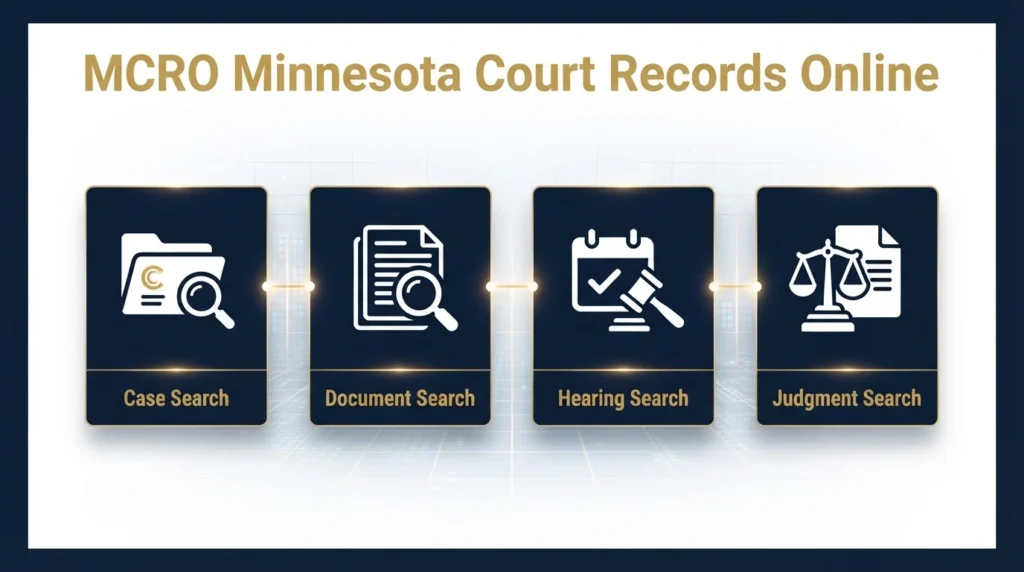
MCRO is Minnesota’s statewide portal for district court case data, and it is built around four separate search tabs, each doing a different job. Understanding which tab to use saves you a lot of wasted clicks.

Case Search allows users to search for court cases by person name, business name, attorney name, case number, citation number, or attorney bar number, and provides access to a Register of Actions and the public documents available online in each case.
Beyond that main tool, three other tabs handle specific tasks:
| MCRO Tool | What It Finds |
|---|---|
| Case Search | Full case details and the Register of Actions |
| Document Search | Public documents in court cases that are available online, searched by case number |
| Hearing Search | Information for hearings scheduled in a court case |
| Judgment Search | Debtor name lookups for judgment details, including any satisfactions, for docketed money judgments |
Knowing this layout matters. A lot of frustrated searchers try to find a document through Case Search when Document Search is the correct tool. Pick the right tab first, and the rest gets a lot easier.
How to Do a Minnesota Court Case Search by Name
Searching by name means entering a person’s or business’s name into MCRO’s Case Search tab, with optional filters to narrow results. This is the most common entry point for people who don’t have a case number handy.
Start by selecting whether you’re searching a person or a business. Then, you can narrow results using Date of Birth, Date Filed, Case Category (Civil, Criminal, Family, Probate or Mental Health), Case Status, and Court Locations, either statewide or a specific county.
One trick almost nobody mentions: you can enter an exact name or use a wildcard trailing after two characters to return broader results. This helps when you’re unsure of spelling.
Steps for a name search:
- Open Case Search and choose Person or Business
- Type the name, using a wildcard (*) if spelling is uncertain
- Add Date of Birth or Date Filed if you know them
- Select a Case Category to narrow the type of case
- Choose Statewide or a specific county, then search
If a name search returns nothing, double check the county filter. A case filed in a different county than expected simply won’t appear.
Minnesota Case Number Search: Step by Step
A Minnesota case number search is the fastest and most precise way to find a specific case, assuming you already have the number. It skips the guesswork that comes with name searches entirely.
Case numbers follow a specific format. Minnesota case numbers use letters, numbers, and hyphens, and MCRO rejects spaces. That single rule trips up more people than anything else on the site.
Enter the no-space case number, or search a public case by party name and a broad court location if you don’t have it. Citation numbers, used for traffic matters, work the same way through a separate field.
Quick Facts Box:
- No spaces allowed in the case number field
- Dashes and leading zeros are often optional depending on the tool
- Citation Number is a separate search option from Case Number
- This method returns the Register of Actions directly, skipping search result lists
If you have the number, use it. It is the single fastest path to a correct result in the entire system.
Key Takeaway: The fastest, most accurate Minnesota court case search always starts with a case number, not a name, whenever you have one available.
Minnesota Criminal Case Search
A Minnesota criminal case search works through the same MCRO Case Search tool, but with an important catch for pending matters. Not every criminal record surfaces the way you’d expect.
Pending criminal, traffic, and petty misdemeanor cases for which there is no conviction will not return in the Case Search Results or Hearing Search Results when searching by defendant name, though pending cases will return when searching by case number. That is a huge detail most guides skip entirely.
If you need a broader criminal history check rather than a single case, there’s a separate state tool. The Minnesota Bureau of Criminal Apprehension runs a free public criminal history search system.
Who should use which tool:
| Need | Tool |
|---|---|
| A specific known case | MCRO Case Search (by case number) |
| General name based criminal case lookup | MCRO Case Search, with the pending case limitation in mind |
| Broad statewide criminal history | BCA Criminal History Search |
For background check purposes, combining both tools gives the fullest picture available to the public.
Minnesota Civil Court Case Search
A Minnesota civil court case search covers lawsuits, contract disputes, small claims, and similar non criminal matters filed in district court. It uses the exact same portal as every other case type.
When filtering by Case Category, Civil is one of four selectable categories alongside Criminal, Family, and Probate or Mental Health. Selecting Civil narrows thousands of unrelated results instantly.
Document access depends on filing date and case type. All Major and Minor Criminal and Civil case types have documents available for download when filed on or after July 1, 2015.
Common civil case subtypes you’ll find:
- Contract and debt collection disputes
- Personal injury claims
- Landlord tenant and eviction matters
- Conciliation court (small claims) filings
Civil searches tend to be more complete than criminal ones since there’s no “pending case hiding” rule tied to convictions. Still, always confirm the county, since civil cases are tied to wherever the lawsuit was actually filed.
Minnesota Document Search in MCRO
A Minnesota document search in MCRO means pulling the actual filed paperwork from a known case, rather than just case summary data. You need a case number to use it.
Document Search allows you to search for public documents in court cases that are available online by entering a Case Number to find and view the case documents. There is no name based option for this specific tool.
Keep in mind this isn’t an official archive. The information available on MCRO is provided as a service and is not the official court case record, and the Minnesota Judicial Branch does not certify MCRO records or search results.
Quick Facts Box:
- Requires exact case number, no spaces
- Documents display in reverse chronological order, most recent first
- Not every document type is scanned or posted online
- Certified copies require a request through local Court Administration
If a document you expect isn’t there, it may simply never have been digitized. That’s a county by county variable, not a search error on your end.
Minnesota Hearing Search
A Minnesota hearing search tells you when and where a scheduled court date is happening for a specific case. It is a separate tab from Case Search, built for calendar style lookups.
Hearing Search provides information for hearings scheduled in a court case, and users can search for hearings by person name, business name, case number, judicial officer, attorney name, or attorney bar number. That judicial officer option is unique to this tool.
Hearing Search is the third tool in MCRO, and it finds scheduled court dates for any case in the state. It’s especially useful for attorneys tracking multiple clients’ calendars at once.
Who uses Hearing Search most:
- Self represented litigants confirming their own court date
- Attorneys managing a busy docket across counties
- Journalists and researchers tracking a public case
- Family members trying to attend a relative’s hearing
One limitation carries over from Case Search: pending criminal cases without a conviction still won’t surface through a name based hearing lookup either.
Minnesota Judgment Search
A Minnesota judgment search locates docketed money judgments by searching for the debtor’s name rather than a case number. It’s a distinct tool from general case lookups.
Judgment Search allows users to search by debtor name for judgment details, including any satisfactions, for docketed money judgments. A “satisfaction” simply means the judgment has been paid off or resolved.
This tool matters most to landlords, lenders, and anyone doing due diligence before extending credit or signing an agreement.
Quick Facts Box:
| Field | Purpose |
|---|---|
| Debtor Name | Who owes the judgment |
| Judgment Amount | How much is owed |
| Satisfaction Status | Whether it’s been paid |
| Filing County | Where the judgment was docketed |
If you need certified judgment information for legal proceedings, remember that certified copies of court documents and civil judgment search results may be obtained from local court administration rather than through MCRO alone.
Key Takeaway: MCRO splits criminal, civil, hearing, and judgment data across four different tools, so picking the right tab matters as much as the search terms you enter.
Minnesota Eviction Court Records Search
A Minnesota eviction court records search is simply a civil case search focused on housing cases. Eviction filings, sometimes called unlawful detainer or eviction action cases, sit inside the Civil category in MCRO.
MCRO is useful for reviewing housing, eviction, and other civil cases specifically. Tenant advocates, landlords, and renters all use it to check filing status before a hearing.
Because eviction cases move fast, search accuracy matters here more than almost anywhere else. Enter the party’s first and last name, and add the county for more accurate results.
Tips specific to eviction searches:
- Always filter by Civil category to cut out unrelated results
- Add the county where the rental property sits
- Use a wildcard if the tenant’s name has an uncommon spelling
- Check Hearing Search immediately after finding the case to confirm the date
Eviction records can move through the system in a matter of weeks, so checking status close to a scheduled hearing date is smart practice.
Minnesota Family Court Records Search
A Minnesota family court records search covers divorce, custody, and related domestic cases, but with far more restricted public access than civil or criminal matters. Privacy protections here are intentionally tighter.
Family is one of the four selectable categories in Case Search, sitting alongside Civil, Criminal, and Probate or Mental Health. You can filter directly to this category to avoid wading through unrelated case types.
Document availability is more limited by design. Access to online documents in these cases is defined by Rule 8, which restricts certain publicly accessible district court case records.
What this means practically:
- You may see that a family case exists without accessing every document
- Juvenile and certain sensitive filings may not appear in search results at all
- A trip to local Court Administration is often required for full file access
- Attorneys of record typically have broader access than the general public
If you’re a party to the case yourself, your attorney or the court administrator can usually unlock access that the public search cannot provide.
Minnesota Attorney Bar Number Search
A Minnesota attorney bar number search lets you pull up every case tied to a specific licensed attorney, using their bar number instead of a name. It’s one of the lesser known entry points into Case Search.
Case Search accepts party names, business names, attorney names, bar numbers, case numbers, and citation numbers. That means the bar number field works exactly like a name field, just more precise.
The process follows a similar pattern to a name search. After selecting Attorney Name or Bar Number, you’ll need to select the Case Status before running the search.
When this search method helps most:
- Verifying which cases an opposing attorney currently handles
- Confirming a lawyer’s current caseload before hiring them
- Journalists tracking an attorney’s involvement across multiple filings
- Court staff cross referencing attorney assignments
Bar number searches tend to return cleaner results than name searches, since there’s no risk of common name collisions.
Minnesota Appellate Court Case Search (P-MACS)
A Minnesota appellate court case search uses a completely different system than MCRO, called P-MACS. This matters because MCRO only covers trial level district courts.
The P-MACS appellate search handles Minnesota Court of Appeals and Supreme Court matters specifically, not the district court cases MCRO is built for.
If you’re searching for a case that’s been appealed, you need to switch tools entirely. P-MACS lets requesters get Minnesota Supreme Court and Court of Appeals case documents directly.
MCRO vs P-MACS at a glance:
| Feature | MCRO | P-MACS |
|---|---|---|
| Court Level | District (trial) courts | Court of Appeals and Supreme Court |
| Case Types | Civil, criminal, family, probate | Appealed cases only |
| Documents | Case filings, orders | Appellate opinions, briefs |
MCRO shows only state court cases, not federal cases or administrative matters, which is a separate limitation from the appellate court distinction above. Keep both boundaries in mind before assuming a case simply “isn’t in the system.”
Minnesota Court Records by County
Minnesota court records by county means understanding that every case, even though searchable statewide through MCRO, is still physically tied to the courthouse where it was filed. That distinction matters for certified copies.
Minnesota court records are public documents filed with the state’s 87 district courts, one per county. MCRO’s search reaches all of them from a single search box, but the underlying file still lives locally.
Every Minnesota District Court case is associated with a filing county, even though MCRO searches statewide. That’s why filtering by county speeds up a name search so much.
Why county matters:
- Certified copies must be requested from the filing county directly
- Public access terminals exist at every county courthouse
- Older, pre-digital files may only exist on paper locally
- Statewide search can surface duplicate name matches across counties
Knowing the likely filing county before you search, whether it’s Hennepin, Ramsey, or a smaller rural county, cuts your search time dramatically.
Key Takeaway: MCRO is one statewide search box, but every result still traces back to one of Minnesota’s 87 individual county courthouses for certified records.
Free Minnesota Court Case Search
A free Minnesota court case search is available to anyone through MCRO, with zero registration and zero cost for basic lookups. This is the default, not a limited trial version.
MCRO is the state’s free, no-registration public access tool for district court records, covering the entire state from one login free portal. You can search without an account for basic case info.
If you’d rather search in person, that option is free too. Every county courthouse in Minnesota has a public access terminal where you can search court records at no charge.
Free search options compared:
| Method | Cost | Registration Needed |
|---|---|---|
| MCRO online | Free | No |
| County public access terminal | Free | No |
| Certified copy request | Small fee per page | Varies by county |
| BCA criminal history search | Free for basic search | No |
The only time you’ll pay anything is when you need an official, certified document for a legal proceeding, not for the search itself.
How to Search Minnesota Court Records Online (Tips and Troubleshooting)
Searching Minnesota court records online works best when you understand a handful of formatting rules before you start typing. Most failed searches come down to one of five fixable mistakes.
A wildcard search, typing the first few letters of a name followed by an asterisk, helps catch spelling errors made by the court or by the filing party. This single trick solves more “no results” problems than anything else.
Always double check the county and case type before assuming a search failed. A narrow filter hides results just as easily as a typo does.
Common troubleshooting checklist:
- Remove all spaces from case numbers before entering them
- Try a wildcard if you’re unsure of exact spelling
- Switch from Statewide to a specific county if results flood in
- Remember pending criminal cases without conviction hide from name searches
- Check P-MACS instead of MCRO if the case was appealed
- Confirm you’re not searching for a federal or administrative matter
Most people give up on a search too early. Run through this checklist before concluding a record doesn’t exist online.
Frequently Asked Questions
Is Minnesota court case search free?
Yes, MCRO is completely free with no account or registration required.
Public access terminals at every county courthouse are free as well.
You only pay if you need a certified copy of a document.
How do I find a Minnesota case by name?
Open the Case Search tab and choose Person or Business.
Enter the name, use a wildcard if spelling is uncertain, and add a county filter.
Select a Case Category like Civil or Criminal to narrow the results further.
Can I search Minnesota criminal records online for free?
Yes, through MCRO’s Case Search tool using a name or case number.
Pending criminal cases without a conviction will not show up in a name search, only in a case number search.
The BCA also runs a separate free public criminal history search for broader results.
How do I find Minnesota appellate court cases?
Appellate cases require a different system called P-MACS, not MCRO.
P-MACS covers Minnesota Court of Appeals and Supreme Court matters specifically.
MCRO only covers district (trial) level court cases.
Why can’t I find my case on MCRO?
The most common reasons are a wrong county filter, a pending criminal status, or a misspelled name.
Family, juvenile, and sealed cases may also have restricted public visibility by design.
Try a wildcard search and double check the case category before assuming the record doesn’t exist.
Final Word
A Minnesota court case search is free, fast, and available to anyone willing to learn the formatting rules. MCRO covers every county, but county filters, wildcards, and case categories make or break your results.
Start with a case number if you have one. If not, use a wildcard name search and narrow by county before giving up.
Bookmark MCRO and check back whenever a case status changes in 2026.
================================================================